Concepts⚓︎
Servers⚓︎
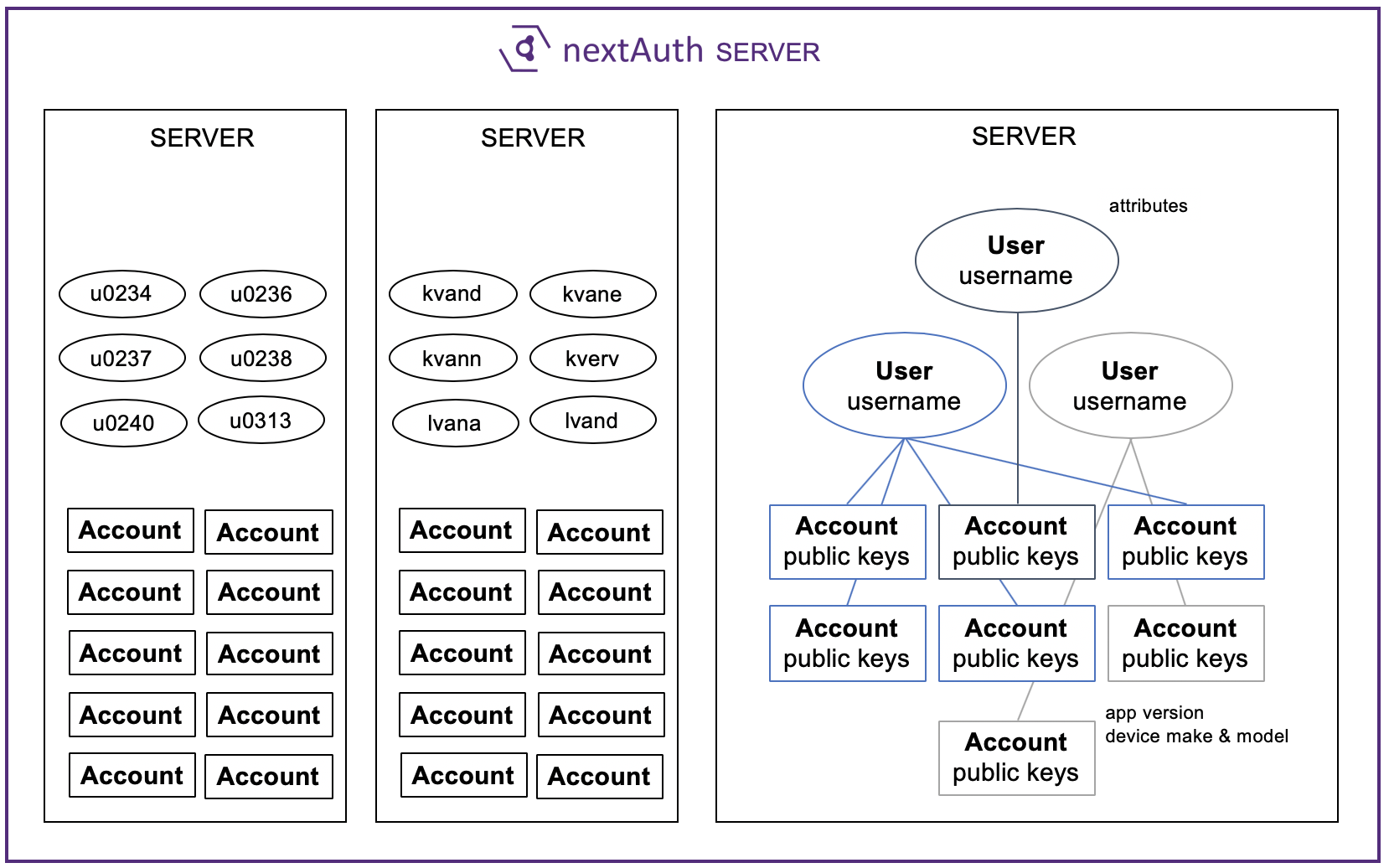
The nextAuth Server (NS) allows you to set up multiple virtual servers running on a single NS. All virtual servers are separated from each other and do not share any data (e.g., sessions, users, accounts). Virtual servers do however run on the same NS, and they do share the same database instance. A server is identified by a randomly generated serverid and is associated with a public/private key pair for server authentication. These are all automatically generated when creating a server through the API.
Each server can be configured separately with a different name, logo, and second factor settings.
Users⚓︎
A user maps the account (associated with public keys) that is attempting to authenticate with a unique userid in your business application’s backend system. The userid can be an arbitrary string chosen by the caller of the REST API. A single user may have multiple accounts associated with it. This 1-to-n mapping allows a business application to support multiple app instances or devices to be linked to the same user in the backend system. For example, a user can be associated with your app on their smartphone and your app on their tablet.
Accounts⚓︎
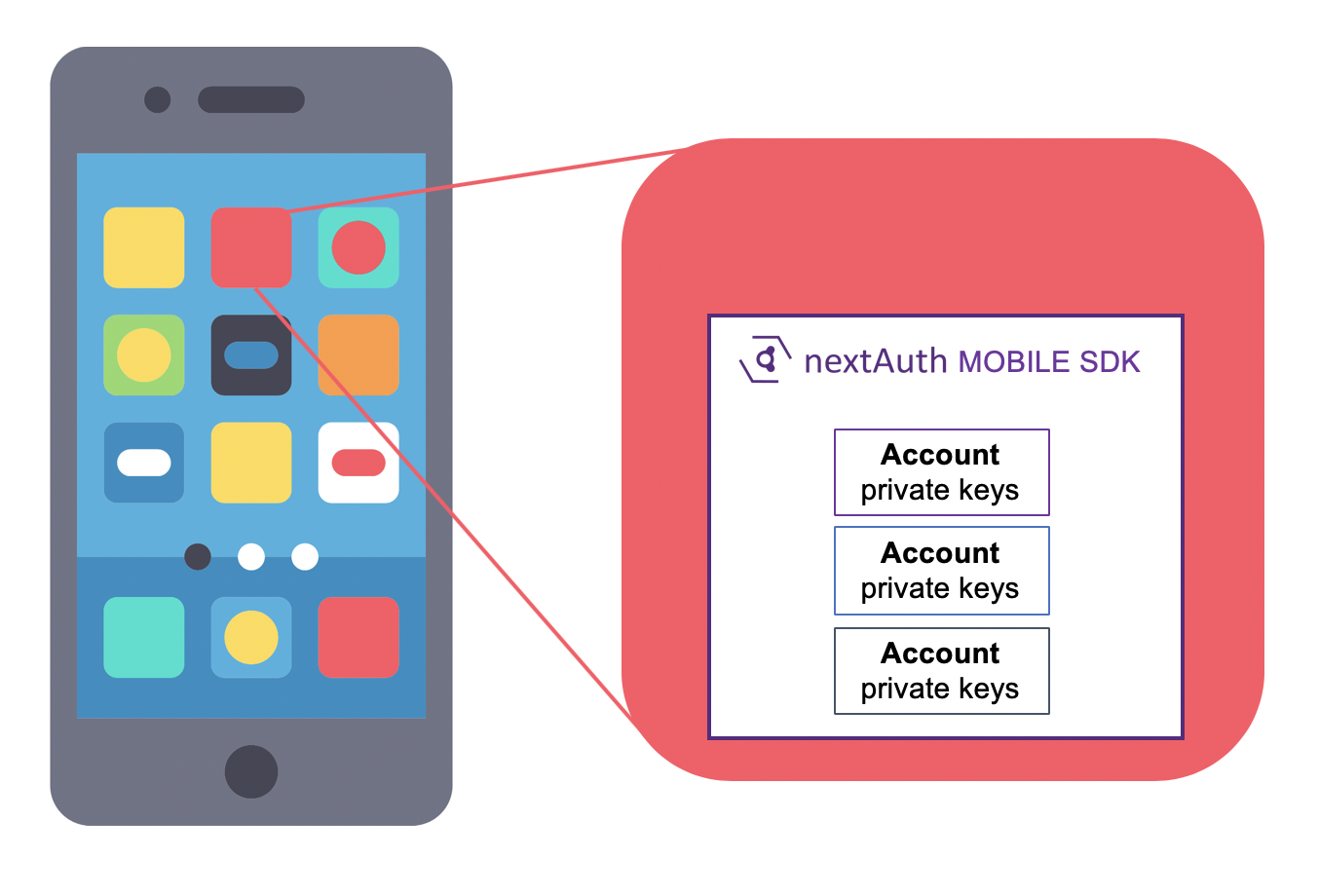
An account means an account inside a mobile app for a specific user at a specific server. Each account has its own public/private key pairs. Even if multiple accounts are associated with one user, each account will have its own unique public/private key pair. Within the same app, there might be multiple accounts corresponding to different users, potentially on different servers. On the server side (on the nextAuth Server, the NS), there might be multiple accounts which correspond to the same mobile device.
An account is considered headless when there is no second factor (PIN or biometrics) associated with it.
Second Factor⚓︎
nextAuth allows for the use of two types of second factors in the Mobile SDK: PIN and biometric. Although one mobile app can have multiple accounts, it can only have one PIN code, which will be shared among all the accounts. For performing the biometric identification, the relevant hardware from the mobile device (e.g. fingerprint scanner or FaceID) is used.
The verification of the second factor is handled by the Second Factor Server (SFS).
Secure Channel⚓︎
A secure channel can be established between the Mobile SDK and the NS for transmitting arbitrary application data. The secure channel uses headless authentication, i.e. device authentication without any user interaction. When available, the hardware of the mobile device is used for authentication. Once the secure channel is established, arbitrary application data can be sent through it. The NS will deliver this application data, along with an identifier of the authenticated account, to a Data Service (DS) endpoint, where it can be handled further by application-specific software. The NS will also store device-specific metadata, such as the app name and the device make and model.
Account creation happens automatically when first using the secure channel from a mobile app. The account will initially be headless. Account upgrading allows adding a second factor to an existing headless account.
Transactions⚓︎
A transaction is used to sign data. The nextAuth solution does not impose any specific structure to the underlying data to be signed.
Transactions can either be created on the NS using API, or be created directly on the mobile device using the Mobile SDK. Every transaction receives a unique identifier from the NS.
Signing a transaction always requires the entry of the second factor (PIN or biometrics) of the user. When a transaction is signed, the NS will store all of the data needed for non-repudiation of the transaction. This includes the signatures from the Mobile SDK as well as the attestation from the SFS. The signed data is also augmented with additional metadata such as timestamps, additional application data, screenshots and device data.
Sessions (Login)⚓︎
Whenever the mobile app performs a login, it does so with respect to a specific session. A Session Identifier, also called the Nonce or webNonce in the API documentation, is an opaque string which can be arbitrarily chosen by the caller of the API call. We recommend using at least 16 random bytes (128 bits) and encoding them as hexadecimal or base64.
Based on the session identifier, you can check by using the API whether a mobile app is currently authenticated for that specific session and, if so, which user and which account of the user is currently logged in.
Internally, neither the nextAuth Servers nor the Mobile SDK store or make use of the session identifiers directly; instead, derived identifiers are used.